.webp)
Three years ago, if you needed to know how much your best customer spent in the last rolling 12 months, broken down by category, someone on your team would build an ad hoc report. They'd pull data into a pivot table, answer your question, and maybe save it in case you asked for it again.
Now? Ask Copilot or ChatGPT, and get your answer in seconds.
Business intelligence is going through a major shift right now. You're moving from clicking through dashboards and waiting for custom reports to just asking questions out loud. But there's a catch people miss - AI can't perform magic tricks with messy data. It needs clean, well-organized information to give you answers you can trust. Building those foundations first is what separates useful AI from frustrating AI.
Here's what's actually changing and why it matters.
Ad hoc reports used to be the workhorses of business intelligence. When you had a specific question that didn't fit into your standard dashboards, someone would build a custom report. They'd load structured data, combine fields in ways the original dashboard builder never anticipated, and generate an analysis to answer your question. Most of the time, these reports lived in spreadsheets and got discarded once they served their purpose.
Building these reports was hard work! Your team had to predict what questions might come up, and they often needed to pull in supplemental data just to complete the analysis. The range of possible business questions was too broad to plan for everything.
Now, tools like ChatGPT and Copilot can handle those same questions conversationally. You ask, they answer. But there's a catch - they still need access to clean, well-modeled data with rich metadata to give you consistent, useful answers. The conversational part is new, but the need for solid data foundations hasn't changed a bit.
Metadata in Power BI semantic models used to be an afterthought. You know those little description fields that show up when you hover over a data field? Most developers left them blank. A lot of people didn't even know they existed. After all, only report builders would ever see them, and if you already knew what "Net Revenue YTD" meant, why bother writing it down?
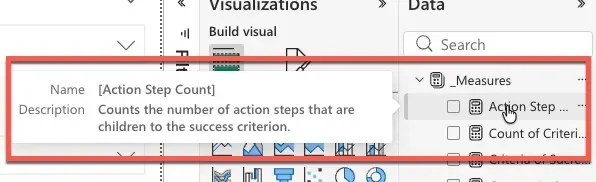
That's changed completely. LLMs like Copilot need that metadata to understand your business in human-readable terms. Without it, AI is guessing what your fields mean, and those guesses won't always match how your company actually defines things.
Microsoft saw this gap and added a whole "prep your data for AI" feature where you can flag fields to ignore, add example questions, and give Copilot more context. They even announced ontologies at Ignite, which let you unify multiple semantic models in one connected vocabulary. This allows AI to finally bridge the gap between business concepts data schemas. In other words, you can talk about your business the way you think about it, and AI will handle the translation to how the data is stored.
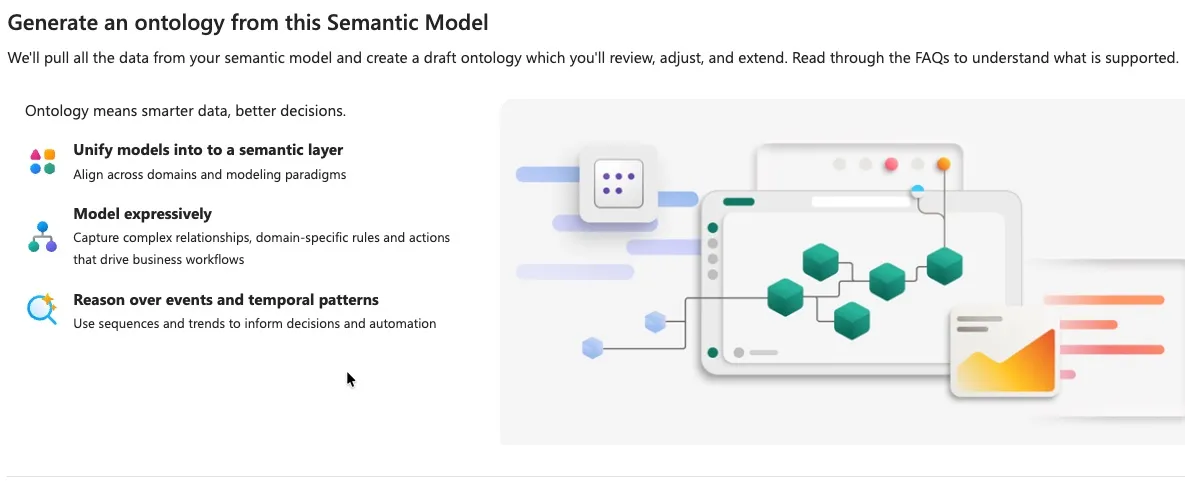
Metadata: from invisible to foundational
Writing metadata descriptions has always been a slog. You'd sit there documenting every field, measure, and calculation in your semantic models for hours. Most teams skip it entirely because it's tedious and the payoff isn't immediately obvious.
Now, Power BI's new "Create with Copilot" button is shifting that dynamic. Click it and AI writes something based on the field name and what it can see in your data. You've got text to work with instead of staring at an empty box, which beats starting from scratch.
The tradeoff is that you're responsible for making sure what AI generates is actually accurate. Here's what the review process looks like:
Semantic models have the richest metadata, but they're not the whole picture. Your underlying data structures matter just as much when someone asks a question AI wasn't prepped for.
Here's a real scenario: You've built a deliveries dashboard that answers the standard questions about shipping times and costs. Then your shipping manager has a novel idea that could save money, but it requires one more piece of data that exists in your warehouse management system. If your dashboard was built by exporting and manually combining six different spreadsheets, AI has nowhere to go. It can't trace back to the source or recommend where to find that missing piece.
If your data is modeled in a standard data architecture, like a lakehouse with medallion architecture, AI can navigate the underlying database layers and point you toward the right objects. The structure of your data determines what questions AI can help you answer.
When AI tools started getting traction, the assumption was they'd replace traditional BI. Why build dashboards when you can just ask ChatGPT for answers?
That's not what happened. AI requires a trusted source of truth. This means that defining and building the “right answer” is more critical than ever. Suppose you ask your AI agent "How many widgets do I have in stock?" and it says "5." Is that right? You might have an intuitive sense, but eventually you need a place to go for the correct answer every single time. Your AI agents need that same anchor point.
Sometimes the hardest part of BI isn't building the dashboard, it's getting everyone in your organization to agree on the right way to measure something. That work didn't go away when AI showed up. If anything, it became more valuable because now AI is using those definitions to answer questions across your entire business.
BI didn't get replaced. It became the foundation AI relies on.
AI is changing how you interact with business intelligence, but it's not replacing the fundamentals. The companies getting the most value from AI in their BI systems are the ones who built solid data foundations first. Clean semantic models, proper metadata, and structured data architectures matter more now, not less.
Know someone navigating AI integration in their BI systems? Share this with them.





.png)
.png)



.webp)